Validation & Transformations: Making Sure Data Is Safe to Use
The strictness which protects the server from malicious attacks or things before entering
Backend
Validations
API Security
Transformations
User Experience
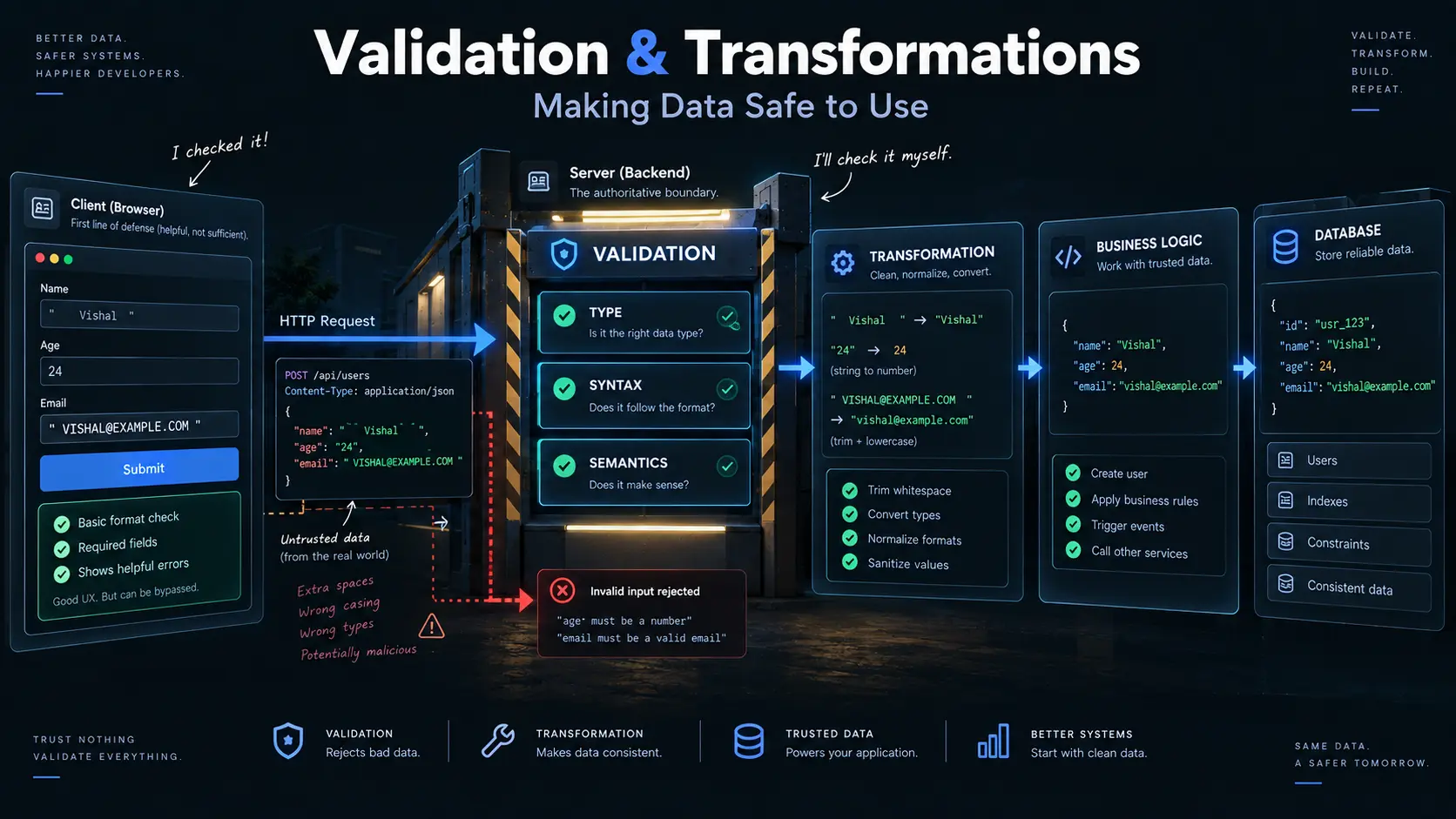
Every time you fill out a form, search for something, create an account, or send information to a website, your data goes somewhere.
For example:
Name: Vishal
Age: 24
Email: vishal@example.com
It might look perfectly fine to you.
But before an application uses or saves this information, it needs to ask:
- Is the name actually a name?
- Was an age entered?
- Is the email written correctly?
- Did the person leave something blank that shouldn't be blank?
- Does the information make sense?
This is where validation comes in.
And sometimes, even when the information is valid, it may not be in the exact form the application wants. That's where transformation comes in.
A simple way to think about it is:
Information comes in
       ↓
Is it acceptable?
       ↓
Validation
       ↓
Make it consistent
       ↓
Transformation
       ↓
Use or save the information
What Is Validation?
Validation means checking whether the information follows the rules required by the application.
Imagine a signup form asking for your name.
If someone enters:
VishalThat's reasonable.
But if they enter:
12345the application may decide that this isn't a valid name.
Similarly, if a required field is completely empty:
Name:the application can reject it.
Validation is basically the application saying:
"Before I use this information, let me check that it looks the way it should."
Why Do We Need Validation?
Without validation, applications could receive all kinds of unexpected information.
For example, imagine an application expects:
Age: 24But receives:
Age: "hello"Or it expects an email:
vishal@example.combut receives:
not-an-emailOr it expects a name but receives nothing at all.
If the application simply accepts everything, problems can appear later.
Validation helps catch these problems before the information reaches the part of the application that depends on it.
Different Kinds of Validation
Not every check is asking the same question.
There are different levels of checking.
The easiest way to understand them is with a simple example.
Imagine you're ordering something online.
You enter:
Name: Vishal
Age: 24
Quantity: 3
The application can check several things about this information.
1. Structure and Format
The first question is:
"Does this information follow the expected format?"
For example, suppose an application expects a phone number to contain only numbers in a particular format.
This would probably be acceptable:
9876543210But this might not be:
hello-phoneThe information doesn't follow the expected pattern.
This type of checking is often called syntactic validation.
In simple words:
Does the information look like it is supposed to look?
For example:
Email
↓
Must follow an email-like format

Phone number
↓
Must follow the expected number format

Username
↓
Must follow allowed character rules
It is mainly concerned with the shape and format of the information.
2. Correct Type of Information
Sometimes the information may look structurally correct but still be the wrong kind of value.
For example, suppose the application expects:
Age: 24but receives:
Age: "twenty four"The field exists.
The value isn't blank.
But the application expected a number.
This is type validation.
It asks:
"Is this information the right kind of value?"
For example:
Name  → text
Age   → number
Active → yes/no
So if an application expects:
Age → numberthen:
24may be acceptable, while:
"hello"is not.
3. Does the Information Make Sense?
Now we reach a different question.
Suppose someone enters:
Age: -5The value is a number.
So the type is correct.
But does it make sense?
Probably not.
Or imagine a shopping application receives:
Quantity: 0Maybe the application doesn't allow an order with zero items.
Or a user enters:
Start date: December 20
End date: December 10
Both dates might be written correctly.
But the combination doesn't make sense for the application's rules.
This is called semantic validation.
In simple words:
Does the information make sense according to the rules of the application?
Syntactic vs Semantic Validation
This distinction is useful because something can be correctly formatted but still be wrong.
Imagine:
Age: -10The value is a number.
So the type is correct.
But the value doesn't make sense.
Another example:
Start date: 20 December
End date: 10 December
Both dates may be written correctly.
But the relationship between them may be invalid.
So we can think of it like this:
Syntactic validation
        ↓
"Is it written correctly?"

Semantic validation
        ↓
"Does it make sense?"
Or:
Correct format doesn't always mean correct information.
Validation in a Signup Form
Let's put everything together.
Imagine a signup form:
Name: Vishal
Age: 24
Email: vishal@example.com
The application might check:
Name
Is it provided?
Is it text?
Does it follow the allowed format?
Age
Is it provided?
Is it a number?
Is it within an acceptable range?Is it provided?
Does it follow the expected format?Only after these checks pass should the application continue.
What Are Transformations?
Validation asks:
"Is this information acceptable?"
Transformation asks:
"Can I put this information into a consistent form?"
Sometimes users provide valid information, but they provide it in different ways.
For example:
Vishal
vishal
VISHAL
These may all represent the same name.
Or consider an email address:
Vishal@Example.comAn application might choose to store it consistently as:
vishal@example.comThe information wasn't necessarily invalid before.
It was simply represented differently.
Transformation helps create a consistent form before the application uses or stores it.
A Simple Example
Imagine a user enters:
Name:    Vishal
Email:   VISHAL@EXAMPLE.COM
The application could transform the email into:
vishal@example.comAnother example:
" Vishal "could become:
"Vishal"The extra spaces don't provide useful information, so they can be removed.
The important distinction is:
Validation
→ Is the information acceptable?

Transformation
→ Can we make acceptable information consistent?
Validation and Transformation Together
These two processes often work together.
Imagine a user enters:
Name:    "   Vishal   "
Age:     24
Email:   " VISHAL@EXAMPLE.COM "
The application could process it like this:
User input
    ↓
Validation
    ↓
Is the information acceptable?
    ↓
Transformation
    ↓
Remove unnecessary spaces
Standardize values
    ↓
Application logic
    ↓
Save/use the information
After transformation, the application might work with:
Name: Vishal
Age: 24
Email: vishal@example.com
Now the information is easier to work with consistently.
Client-Side vs Server-Side Validation
You may have noticed something when using websites.
You type an incorrect email and immediately see:
"Please enter a valid email address."
That's client-side validation.
The check happens in the application running in your browser.
It makes the experience faster because you don't have to wait for the server every time you make a small mistake.
For example:
You enter:

email@example

        ↓

Browser checks it

        ↓

"Please enter a valid email"
This is useful for user experience.
But there's an important problem.
The browser cannot be trusted.
Someone can bypass the browser completely and send a request directly to the server.
That's why applications also need server-side validation.
Why Server-Side Validation Is Necessary
Imagine the browser says:
Age must be between 18 and 100.A user could modify the application or simply send a request directly to the server containing:
Age: 999If the server trusts the browser's checks, the invalid information could still enter the system.
So the server needs to check the information itself.
This gives us a useful mental model:
Client-side validation
        ↓
Helpful guidance for the user

Server-side validation
        ↓
Final protection for the application
Or even simpler:
Client-side validation helps the user. Server-side validation protects the application.
You generally want both.
A Real-World Example
Imagine an online shopping application.
You select:
Quantity: 2The browser checks that the quantity is valid.
Then the request goes to the server:
POST /orders

Product: Laptop
Quantity: 2
The server should still verify:
- Does the product exist?
- Is the quantity allowed?
- Is the product available?
- Is the user allowed to place this order?
- Does the request contain valid information?
The browser's checks are helpful, but the server cannot assume:
"The browser already checked it, so we're good."
The Complete Picture
Validation and transformation are small concepts, but they appear everywhere.
A typical flow looks like:
User enters information
        ↓
Client-side validation
        ↓
Request sent
        ↓
Server-side validation
        ↓
Transformation
        ↓
Application logic
        ↓
Storage / response
Each step has a different responsibility.
The Three Questions to Remember
When you receive information, think about three questions:
1. Is it the right shape?
Does it follow the expected format?That's where syntactic validation comes in.
2. Is it the right kind of value?
Text?
Number?
Yes/No?
That's type validation.
3. Does it make sense?
Does it follow the application's rules?That's semantic validation.
Then:
4. Can we make it consistent?
Remove unnecessary spaces
Normalize values
Convert representations
That's transformation.
The Mental Model
You can remember the entire concept with this:
            User Input
                ↓
        ┌───────────────┐
        │   Validation  │
        └───────────────┘
                ↓
        Is it acceptable?
             /     \
           No       Yes
           ↓         ↓
         Reject   Transform
                     ↓
              Consistent data
                     ↓
              Application logic
                     ↓
                Store / Use
And when it comes to browsers and servers:
Client-side validation
        ↓
Better user experience

        +

Server-side validation
        ↓
Application protection
Never assume that information is safe just because it passed a check in the browser.
Final Takeaway
Validation is about checking information before using it.
Transformation is about turning acceptable information into a consistent form.
They solve different problems, but they work well together.
And validation itself has different layers:
- Type: Is it the right kind of value?
- Syntax: Is it written in the expected format?
- Semantics: Does it make sense according to the application's rules?
Finally, client-side validation makes applications easier to use, while server-side validation provides the final line of defense.
The browser can help the user.
The server still has to make the final decision.