Request & Response Lifecycle: What Happens After You Click a Button?
A simple guide to understanding how a request travels from your browser to a server and how the response comes back.
Web Development
Backend
HTTP
Computer Science
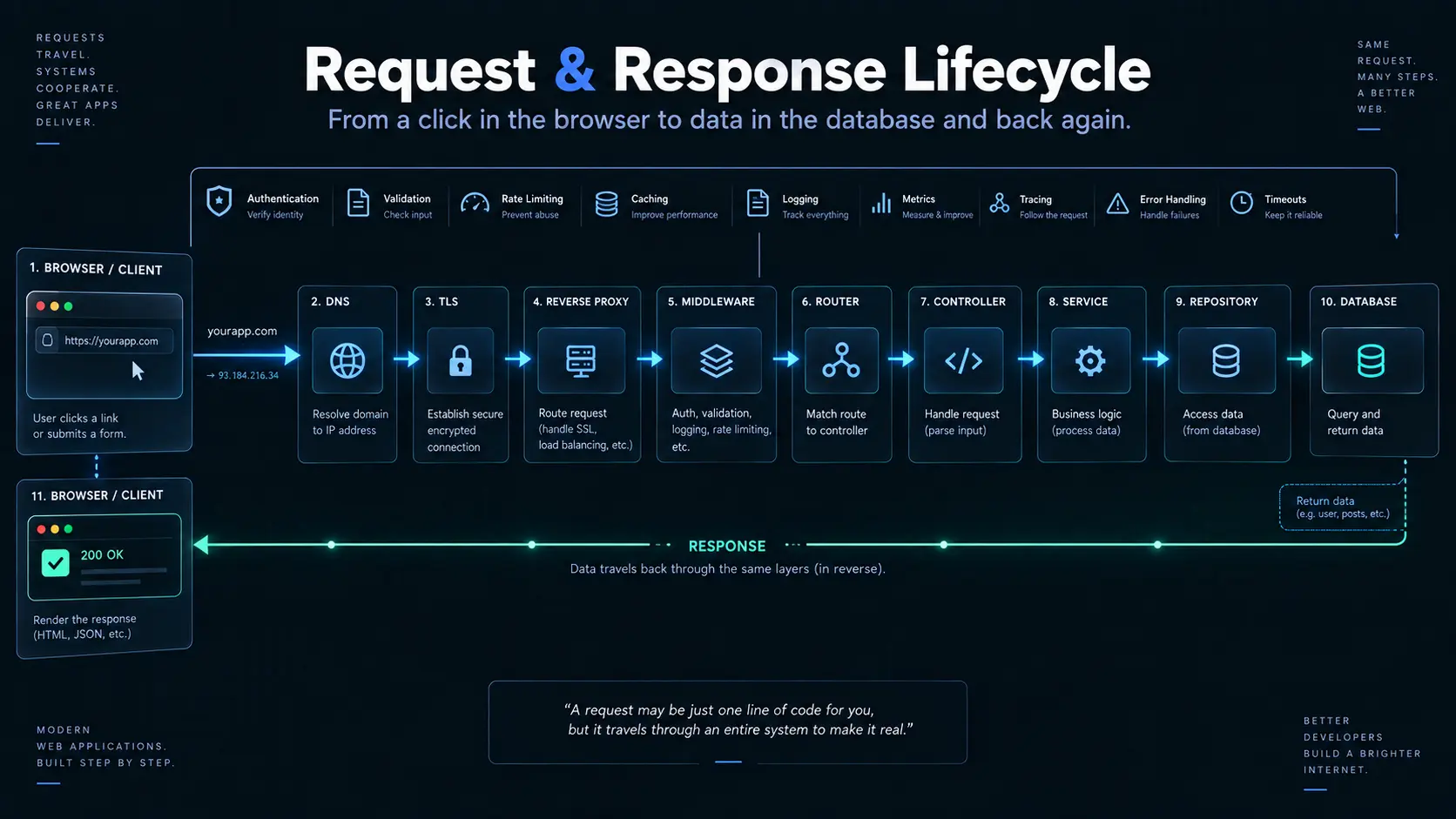
Request & Response Lifecycle: What Happens After You Click a Button?
You click Login.
Or you open a webpage.
Or you search for something.
Or you click Buy Now.
From your perspective, something happens almost instantly.
But behind that click, information is traveling through several steps before you finally see a result.
For example:
You click "Login"
       ↓
Browser sends a request
       ↓
Server receives it
       ↓
Server checks the request
       ↓
Server performs the required work
       ↓
Server sends a response
       ↓
Browser receives it
       ↓
You see the result
This complete journey is called the request-response lifecycle.
Let's follow one request from beginning to end.
Imagine Ordering Food
Before looking at computers, imagine ordering food from a restaurant.
You tell the waiter:
"I'd like a pizza."
The waiter takes your request to the kitchen.
The kitchen prepares the pizza.
The waiter brings it back to you.
The process is roughly:
You
 ↓
Order
 ↓
Waiter
 ↓
Kitchen
 ↓
Food prepared
 ↓
Waiter
 ↓
You
A web application works in a surprisingly similar way.
Browser
 ↓
Request
 ↓
Server
 ↓
Processing
 ↓
Response
 ↓
Browser
The difference is that a real application has many more checks and steps in between.
Step 1: You Do Something
Everything starts with an action.
You might:
- open a website
- submit a form
- search for something
- click a button
- upload a file
- request your profile
- place an order
For example, you enter:
Email: vishal@example.com
Password: ********
and click:
Login
Your browser now needs to communicate with the server.
Step 2: The Browser Sends a Request
The browser creates a request containing information about what it wants.
For example:
POST /loginIt may also contain information such as:
Headers
Body
Cookies
The body could contain:
{
  "email": "vishal@example.com",
  "password": "********"
}
Think of the request as a message saying:
"Server, I would like you to perform this action using this information."
Step 3: The Request Travels to the Server
The request now travels across the network.
There are several things happening behind the scenes before the server's application even processes it.
Your browser communicates with the destination server using network protocols, addresses, and connections.
For now, the simple picture is:
Browser
   ↓
Internet
   ↓
Server
The important thing to understand is that the browser and server are separate systems communicating with each other.
Step 4: The Server Receives the Request
Once the request reaches the server, the application needs to figure out:
"What does this request want?"
For example:
POST /logintells the server that the user is trying to perform a login operation.
The server can now begin processing the request.
But it doesn't necessarily jump directly into the main operation.
There can be several checks first.
Step 5: The Request Goes Through Checks
Before the application performs the main operation, it may perform several checks.
For example:
Request
   ↓
Security checks
   ↓
Rate limit check
   ↓
Request checks
   ↓
Authentication checks
   ↓
Application operation
Think of this like entering an airport.
You don't walk directly onto the airplane.
You go through:
Entrance
 ↓
Security
 ↓
Identity check
 ↓
Gate
 ↓
Flight
A web application can have similar checkpoints.
What Are These Checkpoints?
These are commonly handled by pieces of code called middleware.
Middleware sits between the incoming request and the main operation.
For example:
Request
   ↓
Middleware
   ↓
More Middleware
   ↓
Main Application
   ↓
Response
A middleware might check:
- Is the request allowed?
- Is the user making too many requests?
- Are important security rules present?
- Is the request coming from an allowed website?
- Should certain security information be added?
This means not every request needs to repeat the same checks manually.
Step 6: Understanding the Request
The server receives information in a format designed for communication.
The application needs to understand that information before it can work with it.
For example, the request body might arrive as JSON:
{
  "name": "Vishal",
  "age": 24
}
The server needs to turn that incoming representation into something the application can work with.
This is part of data parsing.
In simple terms:
Parsing means taking incoming information and turning it into a form the application can understand.
What If the Request Is Wrong?
Suppose the server expects:
{
  "name": "Vishal",
  "age": 24
}
but receives:
{
  "name": 123,
  "age": "hello"
}
The server may reject the request.
You might receive:
400 Bad RequestThis basically means:
"The request you sent isn't acceptable."
This can happen because the request is malformed, has invalid information, or doesn't follow the expected structure.
Step 7: Who Handles the Request?
Once the request passes the initial checks, the application needs to decide what code should handle it.
This is where the controller comes in.
A controller is responsible for handling the incoming request and deciding how the HTTP interaction should proceed.
For example:
POST /users
       ↓
User Controller
The controller receives the request and coordinates the next step.
But there is an important idea here:
The controller shouldn't contain everything.
Imagine putting all of this inside one function:
Check request
Validate user
Calculate price
Send email
Talk to database
Create user
Create order
Handle errors
Send response
It quickly becomes difficult to understand and maintain.
This is why applications separate responsibilities.
Step 8: The Server Performs the Actual Work
This is where the application's main rules come into play.
For example, if you're logging in:
Check whether account exists
       ↓
Check password
       ↓
Create authentication state
       ↓
Return result
If you're placing an order:
Check product
       ↓
Check availability
       ↓
Calculate price
       ↓
Create order
The code responsible for these kinds of decisions is commonly called the service layer.
The service handles the actual work and business rules.
A simple way to think about it:
Controller handles the conversation. Service handles the work.
Step 9: The Server May Need the Database
The application often needs information that isn't stored in memory.
For example:
"Does this user exist?"The application asks the database.
This is where the repository comes in.
Think of it as the part of the application responsible for communicating with the database.
The flow becomes:
Controller
    ↓
Service
    ↓
Repository
    ↓
Database
The repository might ask:
Find user by emailThe database returns the information.
Then the result travels back:
Database
    ↓
Repository
    ↓
Service
    ↓
Controller
Why Separate These Responsibilities?
Imagine a restaurant again.
You don't want the person taking your order to also:
- cook the food
- manage inventory
- wash dishes
- handle payments
- maintain the building
Different responsibilities can be separated.
Applications benefit from the same idea.
Controller
→ Handles the request and response

Service
→ Handles application/business logic

Repository
→ Handles database communication
This makes the code easier to:
- understand
- test
- change
- reuse
- maintain
This separation is commonly found in MVC-style and layered application designs.
Step 10: The Server Creates a Response
After the server finishes the required work, it needs to send something back.
For example:
{
  "message": "Login successful"
}
The response can also contain information such as:
Status
Headers
Body
Cookies
The server also communicates whether the operation succeeded or failed.
For example:
200 OKmight mean the request succeeded.
While:
404 Not Foundmight mean the requested resource couldn't be found.
And:
500 Internal Server Errormeans something unexpected went wrong on the server.
Step 11: The Response Travels Back
The response now travels back through the network:
Server
   ↓
Internet
   ↓
Browser
The browser receives it.
If the response contains data, the browser can use that data to update what you see.
Step 12: You See the Result
Finally:
Browser receives response
       ↓
Browser processes it
       ↓
Page/UI updates
       ↓
You see the result
From your perspective, you clicked a button and something happened.
Behind the scenes, a complete request-response journey occurred.
What About Logging?
Now imagine the request fails.
You see:
"Something went wrong."
But the developers need to know:
- What went wrong?
- When did it happen?
- Which part failed?
- Which request caused it?
- Which user was affected?
- What was the server doing at the time?
This is where logging and monitoring become important.
The application can record useful information about what is happening.
For example:
Request received
User authenticated
Order service started
Database query executed
Database query failed
Request returned 500
This makes it much easier to investigate problems.
Why Logging Matters
Imagine a user reports:
"The website didn't let me place my order."
Without useful records, the developer might have to guess.
With proper logging:
Request ID: abc123
User: user-456
Endpoint: POST /orders
Service: OrderService
Error: Database unavailable
Time: 10:42:18
The problem becomes much easier to investigate.
Monitoring takes this further by helping developers understand the health and behavior of the system over time.
What If Something Goes Really Wrong?
Sometimes an error isn't handled where it happened.
For example:
Controller
   ↓
Service
   ↓
Unexpected error
If nothing handles that error properly, it could potentially result in:
- a broken request
- an unclear response
- sensitive information being exposed
- inconsistent application behavior
This is where global error handling is useful.
Instead of every possible error having to independently decide how to respond, the application can have a final safety net.
Request
   ↓
Application
   ↓
Error occurs
   ↓
Local handler?
   ↓
No
   ↓
Global error handler
   ↓
Safe response
The user might simply receive:
Something went wrong.while the detailed error is recorded internally for developers.
This gives better security and a more consistent user experience.
What About Large Amounts of Data?
Sometimes requests or responses contain a lot of information.
For example:
- large files
- images
- videos
- large documents
- large datasets
Sending everything without considering size can be inefficient.
Applications can use compression to reduce the amount of data that needs to travel across the network.
Think of it like packing clothes into a suitcase.
Before:
Large amount of dataAfter compression:
Smaller amount of dataThe receiver can then decompress it and recover the original information.
For very large data, applications can also send information in smaller pieces rather than requiring the entire thing to be transferred at once.
What Is Request Context?
During a request, many different parts of the application may need information about that particular request.
For example:
Request ID
User
Role
IP information
Start time
Authentication information
Instead of passing all this information manually through every function, applications can maintain a request context.
Think of it as a small folder attached to the request.
Request
 ┌───────────────────────┐
 │ Request ID            │
 │ User                  │
 │ Role                  │
 │ Start time            │
 │ Other request data    │
 └───────────────────────┘
Different parts of the application can use the relevant information when needed.
For example, if an error occurs:
Request Context
      ↓
Request ID
      ↓
Logs
Now developers can search for that request ID and follow the request through the system.
This becomes extremely useful when an application has many requests happening simultaneously.
The Complete Journey
Let's put everything together.
Imagine you click:
"Place Order"
The journey might look like this:
                    BROWSER
                       │
                       │ Request
                       ▼
                ┌─────────────┐
                │   Network   │
                └──────┬──────┘
                       │
                       ▼
                 MIDDLEWARE
                       │
             ┌─────────┴─────────┐
             │                   │
          Security           Rate Limit
          Checks              Checks
             │                   │
             └─────────┬─────────┘
                       │
                       ▼
                  CONTROLLER
                       │
                       ▼
                    SERVICE
                       │
                Business Logic
                       │
                       ▼
                  REPOSITORY
                       │
                       ▼
                   DATABASE
                       │
                       ▼
                  REPOSITORY
                       │
                       ▼
                    SERVICE
                       │
                       ▼
                  CONTROLLER
                       │
                       ▼
                   RESPONSE
                       │
                       ▼
                    NETWORK
                       │
                       ▼
                    BROWSER
                       │
                       ▼
                  USER SEES
                    RESULT
And throughout the journey:
Logging
Monitoring
Error Handling
Request Context
can help the application understand what's happening.
One Request, Many Responsibilities
The important thing is that the request doesn't simply go:
Browser → Server → Database → BrowserA real application is more like:
Browser
   ↓
Request
   ↓
Network
   ↓
Middleware
   ↓
Parsing
   ↓
Validation
   ↓
Controller
   ↓
Service
   ↓
Repository
   ↓
Database
   ↓
Repository
   ↓
Service
   ↓
Controller
   ↓
Response
   ↓
Network
   ↓
Browser
With:
Logging
Monitoring
Error Handling
Request Context
supporting the journey.
The Simple Mental Model
If all of this feels like a lot, remember this:
CLIENT
  │
  │ "I need something."
  ▼
REQUEST
  │
  ▼
CHECKPOINTS
  │
  ▼
CONTROLLER
  │
  ▼
SERVICE
  │
  ▼
REPOSITORY
  │
  ▼
DATABASE
  │
  ▼
REPOSITORY
  │
  ▼
SERVICE
  │
  ▼
CONTROLLER
  │
  ▼
RESPONSE
  │
  ▼
CLIENT
  │
  ▼
"I got my answer."
And the supporting systems watch over the journey:
       Logging
          │
Monitoring ┼ Error Handling
          │
     Request Context
A request is not just a message sent to a server. It's a journey through multiple responsibilities before a response can return.
Final Takeaway
The next time you click a button on a website, remember that there is a lot happening between the click and the result.
Your browser creates a request.
The request travels to the server.
The server performs various checks.
The request is understood and processed.
The controller coordinates the HTTP interaction.
The service performs the application's work.
The repository communicates with the database.
The result travels back through those layers.
The server creates a response.
The response travels back to your browser.
And finally, you see the result.
All of this can happen in a fraction of a second.
What looks like:
"I clicked a button."
to a user can actually be:
"A distributed system just completed a carefully controlled request-response journey."
That is the request-response lifecycle.