Serialization and Deserialization: How Data Travels Between Systems
A beginner-friendly explanation of how applications turn data into a transferable format and turn it back into usable data.
Computer Science
Web Development
Networking
APIs
Data
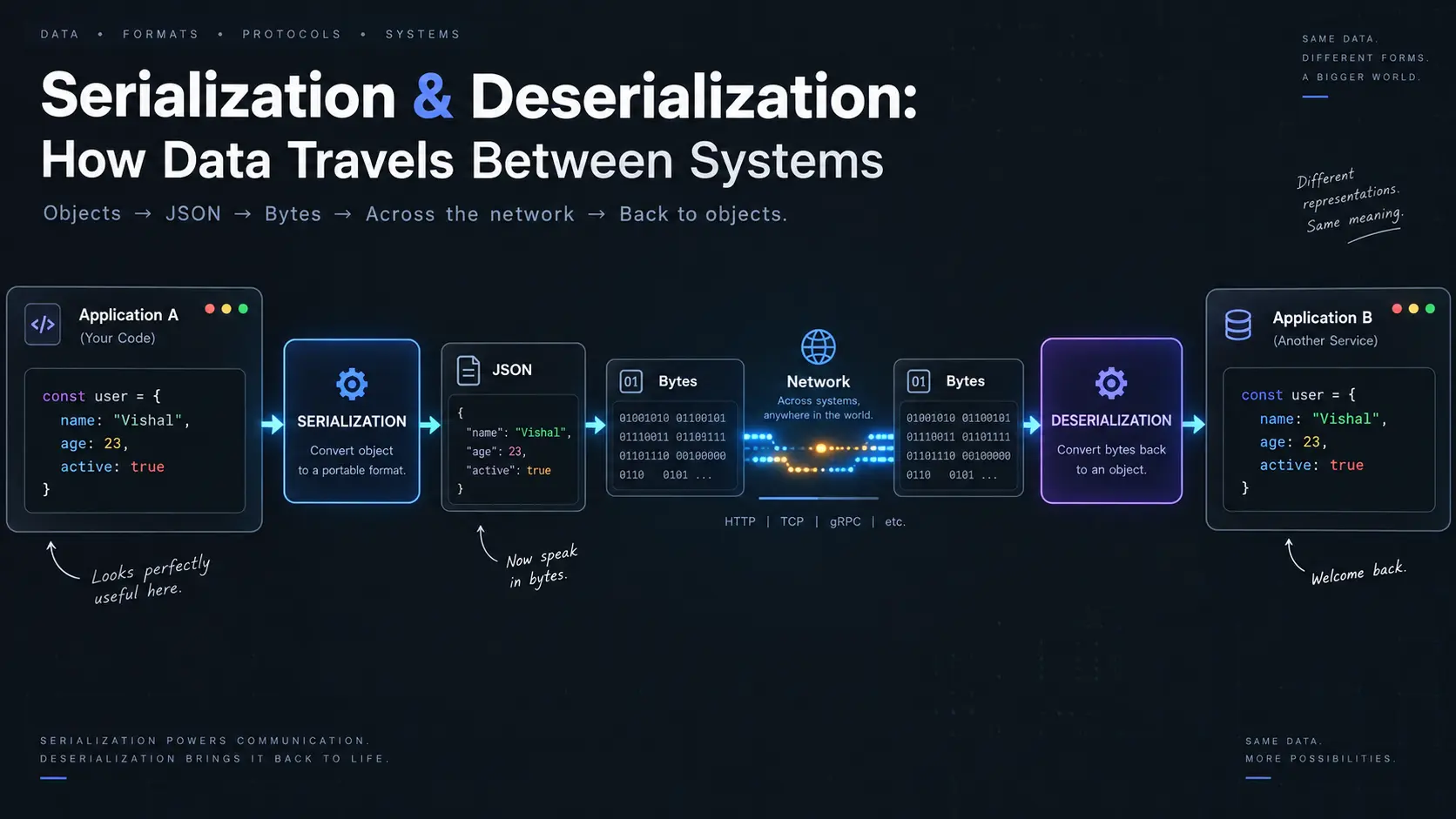
When two applications need to communicate, they have a simple problem:
"How do I take the data I have and give it to another system in a way that it can understand?"
Imagine your application has this:
User
  ↓
Name: Vishal
Age: 23
Active: true
Your application understands this information.
But if you want to send it to another application, you need to put it into a format that both sides understand.
This is where serialization and deserialization come in.
User View
1. What is Serialization?
Serialization is the process of turning data from its normal form into a format that can be stored or sent somewhere else.
Imagine you have this information:
Name: Vishal
Age: 23
Developer: true
Your application understands this as separate pieces of information.
Before sending it over a network, you can turn it into something like:
{
  "name": "Vishal",
  "age": 23,
  "developer": true
}
Now the information has been arranged into a format that another application can understand.
So:
Application Data
       ↓
  Serialization
       ↓
Transferable Data
That's serialization.
2. What is Deserialization?
Deserialization is simply the opposite.
When another application receives the data, it needs to turn that transferred information back into something it can work with.
For example:
{
  "name": "Vishal",
  "age": 23,
  "developer": true
}
can be turned back into usable application data:
Name → Vishal
Age → 23
Developer → true
So:
Transferred Data
       ↓
 Deserialization
       ↓
Application Data
The complete journey looks like:
Sender
  ↓
Application Data
  ↓
Serialization
  ↓
Transfer
  ↓
Deserialization
  ↓
Receiver
3. Why Do We Need This?
You might wonder:
"Why can't we just send the data directly?"
Because two applications don't necessarily store or understand information in exactly the same way.
For example, one application might be written in:
JavaScriptwhile another is written in:
Javaor:
Pythonor:
GoThey may represent their data differently internally.
Instead of forcing every application to understand every other application's internal data structure, we can agree on a common format.
For example:
JavaScript
     ↓
   JSON
     ↓
Python
The JavaScript application doesn't need to know exactly how Python stores its objects internally.
It only needs to follow the agreed format.
This makes communication much easier.
4. Think About It Like Different Languages
Imagine two people:
Person A → speaks Hindi
Person B → speaks English
They need to communicate.
One solution is to agree on a language that both understand.
For example:
Hindi
  ↓
Common Language
  ↓
English
Serialization works in a similar way.
The applications may work internally in different ways, but they can communicate using a common format.
Application A
      ↓
 Common Format
      ↓
Application B
That's one of the main reasons serialization is useful.
5. A Real API Example
Imagine you open a shopping website.
The website asks the server:
"Give me product information."The server has this information:
Product
Name: Mechanical Keyboard
Price: 2500
Available: Yes
Before sending it back, the server can turn it into:
{
  "name": "Mechanical Keyboard",
  "price": 2500,
  "available": true
}
The browser receives it.
Then it turns that data into something it can use to display the product.
The flow becomes:
Browser
   │
   │ Request
   ▼
Server
   │
   │ Product data
   ▼
Serialization
   │
   ▼
JSON
   │
   │ Network
   ▼
Browser
   │
   ▼
Deserialization
   │
   ▼
Display Product
You interact with the product.
Behind the scenes, the data has gone through a transformation.
6. Two Broad Types
Serialization formats can broadly be divided into two categories:
Serialization
     │
     ├── Text-based
     │
     └── Binary-based
The main difference is how the resulting data is represented.
7. Text-Based Serialization
Text-based formats represent information as readable text.
One of the most common examples is JSON.
For example:
{
  "name": "Vishal",
  "age": 23,
  "developer": true
}
You can open this in a text editor and understand what it says.
Other examples include:
JSON
XML
CSV
YAML
They are useful when readability and simplicity are important.
8. Binary-Based Serialization
Binary formats represent information using bytes rather than human-readable text.
Instead of seeing:
{
  "name": "Vishal",
  "age": 23
}
you might see something that looks like:
8F 01 A7 03 42 ...Humans don't normally read this directly.
Computers can process it efficiently.
Examples include:
Protocol Buffers
MessagePack
Avro
CBOR
Binary formats are often useful when performance, compact data size, or efficient processing matters.
9. Text vs Binary
A simple comparison:
| Text-Based | Binary-Based | |
|---|---|---|
| Easy for humans to read | Yes | Usually no |
| Data size | Often larger | Often smaller |
| Easy to debug | Yes | Usually harder |
| Common example | JSON | Protocol Buffers |
| Good for | APIs, configuration, debugging | High-performance communication |
Neither one is automatically better.
The right choice depends on the system.
10. Where Do We Use Serialization?
Serialization is happening in many places without us noticing.
APIs
When a frontend communicates with a backend:
Frontend
   ↓
JSON
   ↓
Backend
Microservices
When one server communicates with another:
Service A
   ↓
Serialized message
   ↓
Service B
Saving Data
You may serialize data before storing it somewhere.
For example:
Application Object
       ↓
Serialization
       ↓
File / Cache / Storage
Later:
Storage
   ↓
Deserialization
   ↓
Application Object
Messaging Systems
Messages sent through systems such as message queues also need a format that the sender and receiver understand.
Producer
   ↓
Serialize
   ↓
Message
   ↓
Queue
   ↓
Consumer
   ↓
Deserialize
11. Serialization Is Not Just About APIs
This is an important point.
It is easy to associate serialization only with:
Frontend ↔ BackendBut it is much broader.
It can happen whenever structured information needs to cross a boundary.
For example:
Application
    ↓
Network
or:
Application
    ↓
Database
or:
Application
    ↓
File
or:
Service A
    ↓
Message Queue
    ↓
Service B
The common idea is:
Data needs to leave one context and be understood somewhere else.
12. What Does the OSI Model Have to Do With It?
This is where things get interesting.
The OSI model describes networking as different layers:
7. Application
6. Presentation
5. Session
4. Transport
3. Network
2. Data Link
1. Physical
Serialization has a strong conceptual connection to the Presentation Layer, which is Layer 6.
The Presentation Layer is concerned with how information is represented so that different systems can understand it.
This can include things such as:
Data representation
Encoding
Conversion
Encryption
Compression
Serialization fits naturally into this idea because we are transforming application data into a representation that can be transferred or stored.
13. A Simple OSI View
Imagine:
Application
     ↓
"Here is my data."
     ↓
Presentation
     ↓
"Let's represent it in a transferable format."
     ↓
Transport
     ↓
Network
     ↓
Data Link
     ↓
Physical
On the receiving side:
Physical
     ↓
Data Link
     ↓
Network
     ↓
Transport
     ↓
Presentation
     ↓
"Let's turn this representation back into usable data."
     ↓
Application
So conceptually:
Sender

Application Data
       ↓
Representation
       ↓
Network
       ↓
Transfer
       ↓
Network
       ↓
Representation
       ↓
Application Data

Receiver
14. One Important Clarification
The OSI model is a conceptual model.
Real-world protocols do not always map perfectly to exactly one OSI layer.
For example, JSON is an application-level data format used by applications such as web APIs.
So it would be too simplistic to say:
"JSON is the OSI Presentation Layer."
A better way to think about it is:
Serialization performs a data-representation job that is conceptually related to the responsibilities of the OSI Presentation Layer.
In modern web development, these responsibilities are often handled by application protocols and libraries rather than by a distinct, separately visible "Presentation Layer."
15. The Complete Journey
Let's put everything together.
Suppose you have:
User
Name: Vishal
Age: 23
Your application has this data internally.
Before sending it:
Application Data
       ↓
Serialization
       ↓
JSON
Then the data travels through the network:
JSON
 ↓
HTTP
 ↓
Transport
 ↓
Network
 ↓
Data Link
 ↓
Physical
At the other end:
Physical
 ↓
Data Link
 ↓
Network
 ↓
Transport
 ↓
HTTP
 ↓
JSON
 ↓
Deserialization
 ↓
Application Data
The receiver can now work with the information.
16. The Most Important Idea
The easiest way to remember serialization and deserialization is:
Serialization

Useful application data
        ↓
Transferable representation
And:
Deserialization

Transferable representation
        ↓
Useful application data
Together:
          Serialization
               ↓
Application → Data Format → Network → Data Format → Application
                                                    ↑
                                             Deserialization
17. Final Mental Model
Whenever data crosses a boundary, ask:
Where is the data coming from?
            ↓
How is it represented internally?
            ↓
What format will both sides understand?
            ↓
How will it be serialized?
            ↓
How will it travel?
            ↓
How will the receiver deserialize it?
            ↓
How will the receiver use it?
The entire concept can be reduced to:
Object
  ↓
Serialize
  ↓
Common Representation
  ↓
Transfer / Store
  ↓
Deserialize
  ↓
Object
That's the core idea.
Serialization and deserialization are not complicated rules that applications follow just because networking requires them.
They are simply a way of saying:
"Let's put our data into a format that can cross a boundary, and then turn it back into something the other side can use."