How Web Routes Know Where to Send Your Request
A simple guide to routing, static routes, dynamic routes, query parameters, nested routes, route versioning, deprecation, and catch-all routes.
Web Development
Routing
APIs
HTTP
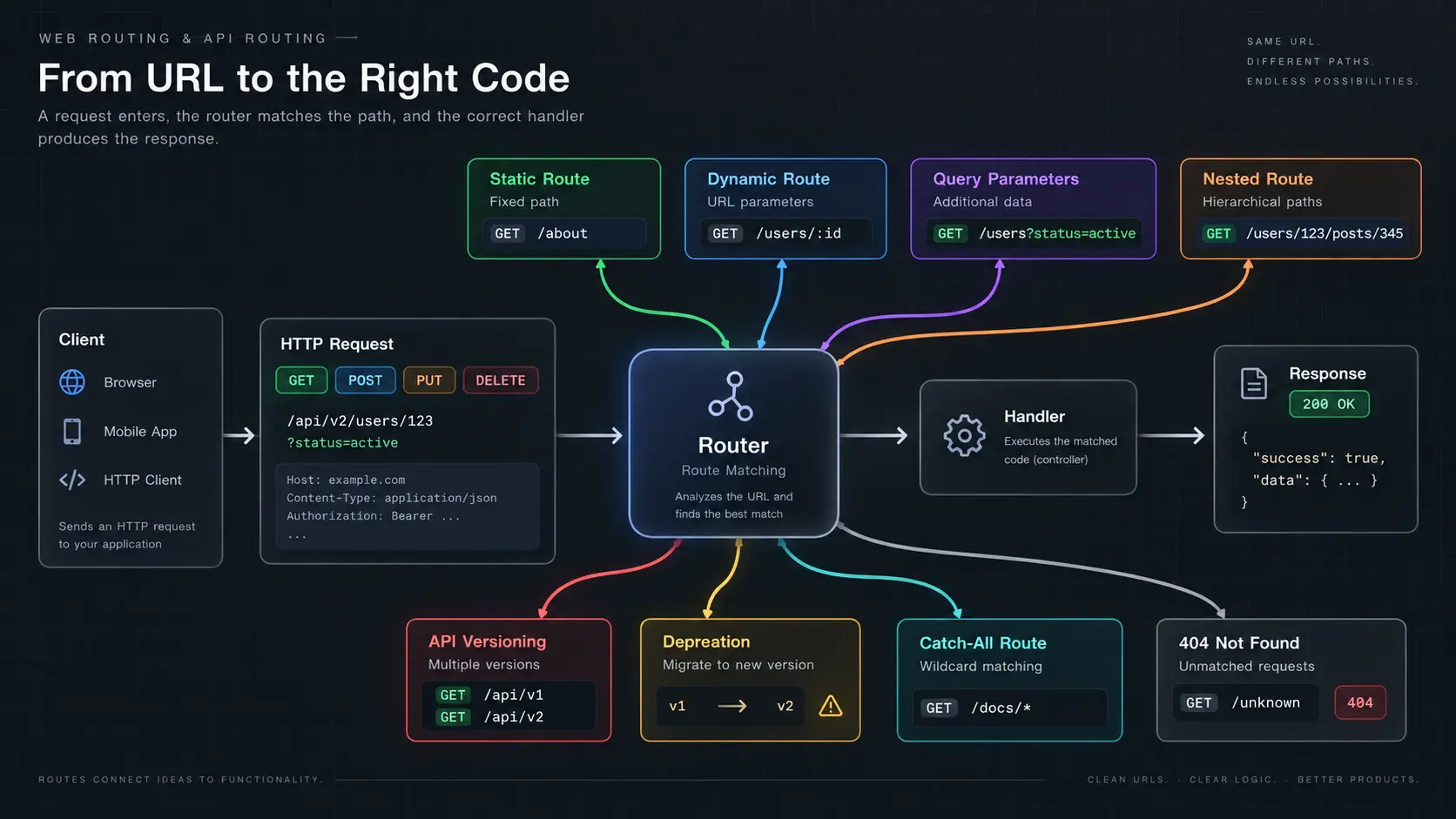
Have you ever wondered what actually happens when you open a URL like:
https://example.com/users/123It looks simple.
But your application needs to figure out:
- What are you asking for?
- Which part of the application should handle it?
- Is
123important? - Are you asking for a specific user or a list of users?
- What happens if the URL doesn't exist?
This is where routing comes in.
1. What is Routing?
Think of routing like an address system.
When you visit:
/users/123your application needs to know:
"Where should this request go?"
Routing is the process of deciding which part of your application should handle a request.
A very simplified flow looks like this:
You
 ↓
Request
 ↓
Server
 ↓
Find the matching route
 ↓
Handle the request
 ↓
Send a response
 ↓
You
For example, if you request:
GET /usersthe application might understand:
"The user wants a list of users."
And if you request:
GET /users/123it might understand:
"The user wants information about user 123."
A request can also contain other information such as headers, query parameters, and a body.
But the route is what helps the application decide where the request should go.
2. Static Routes
A static route is a route that stays the same.
For example:
/aboutis always:
/aboutAnother example:
/contactThere is nothing changing inside the route.
You could have:
/about
/contact
/pricing
/login
Each one is a fixed address in your application.
For example:
GET /pricingcould simply mean:
/pricing
   ↓
Pricing page
Think of a static route like your house address.
Your address doesn't change every time someone visits you.
3. Dynamic Routes
Now imagine you have thousands of users.
You could technically create:
/users/1
/users/2
/users/3
/users/4
/users/5
But that would be ridiculous.
Instead, you can create one route that represents all users:
/users/:idThe id can change.
So:
/users/123means:
id = 123And:
/users/456means:
id = 456The route structure stays the same:
/users/:idbut the value changes.
You might see the same idea with:
/products/42
/posts/100
/orders/9001
The number identifies the specific thing you want.
Simple way to remember it
/users/:id
       ↑
    can change
So a dynamic route is basically:
One route that can handle many different values.
4. Static vs Dynamic Routes
The difference is easier to understand with a table:
| Type | Example | What changes? |
|---|---|---|
| Static | /about | Nothing |
| Dynamic | /users/123 | User ID |
| Dynamic | /products/42 | Product ID |
| Dynamic | /posts/100 | Post ID |
Think about it like this:
Static route
    ↓
Fixed address

Dynamic route
    ↓
Address with a changing part
5. Query Parameters
Sometimes the URL path isn't enough.
Imagine you have a website with thousands of users.
You don't just want all users.
You want:
"Give me only users whose account is active."
You could use:
/users?status=activeThe part after the ? is called a query parameter.
Here:
/users?status=active
       └──────────┘
       extra information
The main route is still:
/usersBut you're giving the application some additional information.
You're basically saying:
"Give me users, but only the ones with an active account."
Multiple Query Parameters
You can have more than one.
For example:
/users?status=active&sort=nameNow you're saying:
"Give me active users and sort them by name."
Another example:
/products?category=shoes&sort=priceThis could mean:
"Show me shoes and arrange them by price."
You might also see:
/products?page=2&limit=20which could mean:
"Give me the second page with 20 products."
6. Dynamic Routes vs Query Parameters
This is an important difference.
Look at:
/users/123This usually means:
"I want this specific user."
Now look at:
/users?status=activeThis usually means:
"I want users that match this condition."
A useful way to think about it is:
Path
 ↓
What thing do I want?

Query parameters
 ↓
How should I filter, sort, search, or customize it?
For example:
/products/123means:
"Give me product 123."
While:
/products?category=shoesmeans:
"Give me products from the shoes category."
7. Nested Routes
Sometimes one thing belongs to another thing.
For example:
/users/123/posts/345You can read this as:
"Post 345 belonging to user 123."
The structure is:
/users
   ↓
  123
   ↓
 /posts
   ↓
  345
Another example:
/companies/10/employees/25could mean:
"Employee 25 inside company 10."
This is useful when there is a clear relationship between two things.
One Important Thing About Nested Routes
A nested route does not mean the server is making multiple requests.
For example:
/users/123/posts/345is still one request.
The nesting simply tells us how the resources are related.
Think of it like an address:
Country
  ↓
City
  ↓
Building
  ↓
Apartment
It describes where something belongs.
8. Route Versioning
Imagine you build an API.
You start with:
/api/v1/usersEverything works.
A year later, you realize that you need to change the way your API returns user information.
The old version might return:
{
  "name": "Vishal"
}
But the new version might return:
{
  "firstName": "Vishal",
  "lastName": "..."
}
If you suddenly change the existing route:
/api/v1/usersapplications that already depend on it might stop working.
That's a problem.
Instead, you can create:
/api/v2/usersNow you can have:
/api/v1/users
/api/v2/users
The old users of your API can continue using v1.
New applications can use v2.
9. Why Do We Need Versioning?
Imagine your API is being used by:
Website
Mobile App
Another Service
Third-party Application
If you suddenly change the API, you might break all of them.
Versioning gives everyone time to move to the new version.
A simple picture:
             API
              |
       ┌──────┴──────┐
       ↓             ↓
      v1             v2
       |              |
   Old clients    New clients
Eventually, everyone can move to v2.
10. Deprecating an Old Route
Now imagine you have:
/api/v1/users
/api/v2/users
You don't want to maintain v1 forever.
But you also don't want to suddenly delete it.
So you deprecate it.
Deprecation basically means:
"This still works, but you should stop using it because it will be removed later."
The lifecycle could look like this:
v1 launched
    ↓
v2 launched
    ↓
v1 deprecated
    ↓
Users move to v2
    ↓
v1 removed
This is much safer than suddenly deleting the old route.
11. Catch-All Routes
Sometimes you want one route to handle many different paths.
Imagine you have documentation:
/docs/getting-started
/docs/backend/authentication
/docs/backend/database
/docs/deployment
Instead of creating a completely separate route for every possible documentation path, you can use a catch-all route.
Conceptually:
/docs/*The * basically means:
"There can be different things after
/docs."
So it could match:
/docs/getting-started
/docs/backend/authentication
/docs/backend/database
/docs/deployment
The exact syntax can be different depending on the framework you're using.
12. Catch-All Does Not Automatically Mean 404
This is an important distinction.
A catch-all route is something you intentionally create to match a broad set of paths.
An unmatched route is different.
For example:
/something-that-does-not-existIf your application doesn't have a route for it, the normal response would be:
404 Not FoundSo:
Catch-all route
    ↓
Intentionally matches many paths
while:
No matching route
    ↓
404 Not Found
They are not the same thing.
13. Let's Put Everything Together
Imagine we're building an online store.
Static Route
GET /productsMeans:
"Give me the products."
Dynamic Route
GET /products/123Means:
"Give me product 123."
Query Parameters
GET /products?category=shoes&sort=priceMeans:
"Give me shoes and sort them by price."
Nested Route
GET /users/123/orders/456Means:
"Give me order 456 belonging to user 123."
Versioned Route
GET /api/v1/products
GET /api/v2/products
Means:
"Use the old or new version of the API."
Catch-All Route
/docs/*Means:
"Handle different paths underneath
/docs."
14. A Realistic URL
Now let's look at a slightly bigger URL:
GET /api/v2/users/123/orders/456?status=paidWe can break it down:
/api
  ↓
API

/v2
  ↓
API version

/users
  ↓
Users resource

/123
  ↓
Specific user

/orders
  ↓
Orders belonging to that user

/456
  ↓
Specific order

?status=paid
  ↓
Additional filter
So the URL is telling the server a lot:
Which API?
     ↓
Which version?
     ↓
Which user?
     ↓
Which order?
     ↓
What additional condition?
15. The Simple Mental Model
Whenever you see a URL, try breaking it into pieces.
Ask yourself:
What is fixed?
     ↓
What can change?
     ↓
Are there extra conditions?
     ↓
Is something inside another thing?
     ↓
Is this API versioned?
     ↓
What happens if this route doesn't exist?
For example:
/api/v2/users/123/posts/345?sort=latestcan be understood as:
GET
 │
 ├── /api
 │
 ├── /v2
 │
 ├── /users
 │
 ├── /123          ← specific user
 │
 ├── /posts
 │
 ├── /345          ← specific post
 │
 └── ?sort=latest  ← extra instruction
Once you start looking at URLs this way, routing becomes much easier to understand.
Final Thought
Routing can sound complicated when you first encounter terms like:
- Static routes
- Dynamic routes
- Query parameters
- Nested routes
- Versioning
- Deprecation
- Catch-all routes
But they are all solving fairly simple problems.
At its core:
Routing is simply how your application decides where a request should go and how to understand what the user is asking for.
The next time you see a URL, don't just see it as a string.
Break it apart.
Route
 ↓
Fixed parts
 ↓
Changing parts
 ↓
Extra information
 ↓
Relationships
 ↓
Version
And suddenly, that long URL starts making a lot more sense.